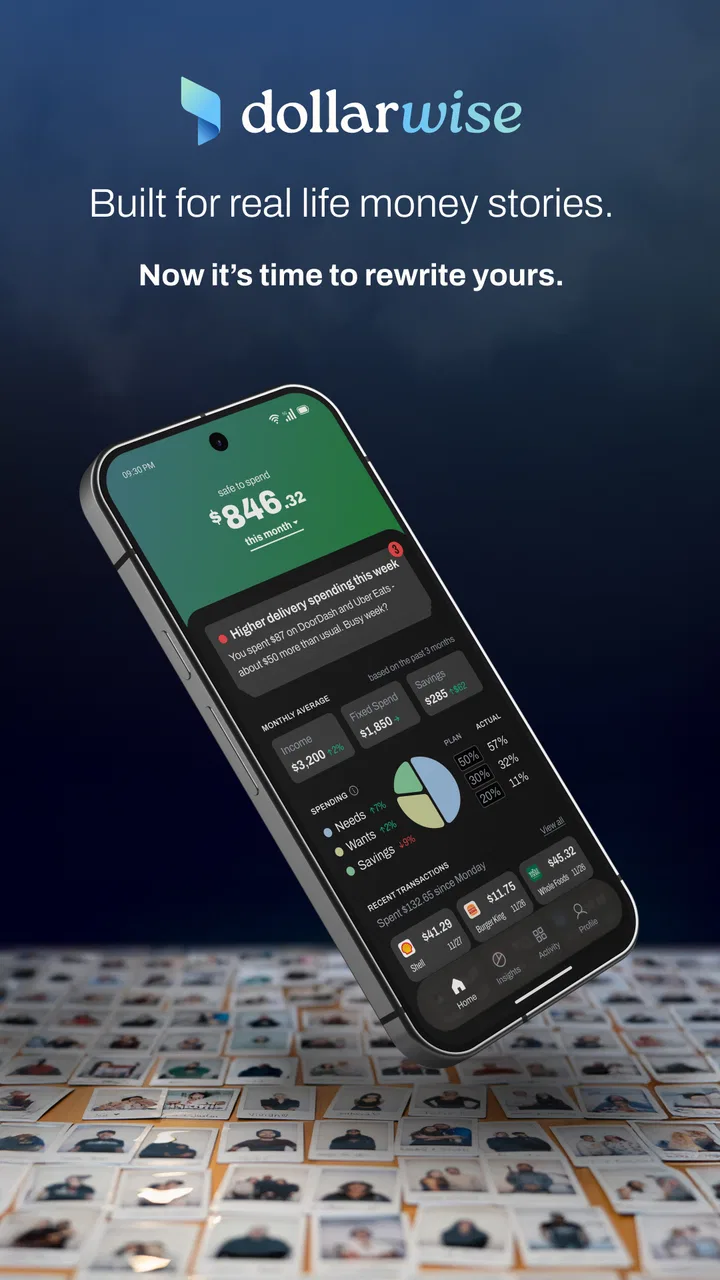
Dollarwise: Budget & Tracking
- 3.3
- Rating
- 100.00K
- Installs
- Free
- Price

 Analysis by App-foxy
When I first opened Dollarwise: Budget & Tracking, I approached it as someone who wanted less friction around everyday money, not another complicated financial dashboard. The app belongs to the finance category and comes from HammerMedia, with a simple promise behind its “Rewrite your money story” message: make spending easier to notice and budgeting easier to start. That focus makes sense for a first-time user who feels that a full spreadsheet is too much work but still wants more control than checking a bank balance occasionally.
My overall impression is mixed in a useful way. Dollarwise feels approachable enough for someone building a money habit, and its free entry point removes the biggest barrier to trying it. At the same time, the average rating of 3.3 from roughly two thousand ratings suggests that the experience is not equally smooth for everyone. I would not treat that figure as a verdict by itself, but it is a good reason to begin with modest expectations: this is an app to test against your routine, not a financial system I would trust blindly from the first minute.
Getting from installation to a useful money habit
I’d use the first few days to make the routine feel effortless rather than trying to build a perfect budget all at once. Choosing one purchase-entry moment that already fits my day gives the app a fair test, and a quick review can show whether tracking is helping me act on my spending. From there, I’d look at what to expect before getting started.
You May Also Like

 Blood Strike: 2.5 Anniversary
Blood Strike’s Loadouts Turn Every Drop Into a Tactical Gamble
A close look at Blood Strike’s custom loadouts: how fast access to signature weapons reshapes its battle royale rhythm, rewards preparation, and narrows the gap between fights.

 Pandora - Music & Podcasts
Pandora’s Music Is Easy to Start, but Harder to Recover
Pandora’s strength is its low-effort path from a seed to a station. Its weak spot is how much confidence it asks you to place in connection, setup, and quiet recovery.

 8 Ball Pool
 Is Built on Rivalries, Rematches, and Routine
A close look at the rivalries, rematches, shared routines, and unanswered safety questions that turn a quick pool match into a persistent mobile community.

 Samsung Music
’s Quiet Strength Is Playing What You Already Own
Its reach comes less from spectacle than from dependable access to a personal library. That simplicity is both the app’s strongest retention engine and its ceiling.

 AccuWeather: Weather Radar
AccuWeather Review: A Quick, Clear Forecast for Everyday Decisions
For everyday plans, the best forecast is the one you can understand quickly. AccuWeather makes rain timing, radar, and local conditions easy to act on, with a few trade-offs.

 Hill Climb Racing
Why Hill Climb Racing Still Turns Crashes Into One More Run
A tiny car, a bumpy hill and one more upgrade: Hill Climb Racing keeps resurfacing because its simple chaos makes every near-miss feel personal.
More From Our News Desk



What to expect before you begin
Dollarwise is a free app for everyone, and it runs on Android seven or later. It was released on January 9, 2025, and the current version is 6.4.0. Those details matter mainly because they set a practical expectation: the app is relatively new, so I would pay attention to how comfortably it fits your device and your personal way of tracking money rather than assuming it replaces every mature budgeting tool.
The first thing I would decide is what job I want the app to perform. A budget tracker can help me answer questions such as “Where did my money go this week?” or “Can I afford this purchase without disturbing the rest of the month?” It cannot, by itself, make irregular income predictable or turn incomplete entries into accurate records. Dollarwise works best when I give it one clear purpose at the beginning, such as monitoring food spending, keeping an eye on discretionary purchases, or creating a basic view of recurring household costs.
That choice prevents a common beginner mistake: trying to record every financial detail immediately. If I start with rent, utilities, subscriptions, transport, groceries, entertainment, cash purchases, transfers and long-term goals all at once, the app can become another chore. I prefer to begin with the spending area that causes the most uncertainty. Once that area becomes visible, adding more detail feels worthwhile instead of overwhelming.
The free price is helpful for this trial period, but the app also includes in-app purchases ranging from about fifteen dollars to five hundred dollars per item. I would therefore look carefully at any upgrade screen before confirming anything, especially if I am only experimenting. A free download does not automatically mean that every useful part of the experience is free, so I would treat optional purchases as a decision to make after I understand the basic workflow.
Setting up without creating extra work
My advice for the first setup is to keep the starting picture deliberately small. I would choose a time period that matches how I actually receive and spend money, then enter only the figures I can verify easily. If my income varies, I would use a conservative amount rather than my best month. That makes the resulting budget more realistic and avoids the discouraging experience of “meeting” a target that was too optimistic from the start.
I would also separate fixed commitments from flexible spending in my own notes or mental plan before entering anything. Fixed costs are the payments that are difficult to move; flexible costs are the areas where I can adjust. This distinction is more useful than simply collecting a long list of categories because it tells me what action to take when spending rises. If groceries go over plan, I can adapt another flexible area. If a fixed payment is higher than expected, I need a different solution.
One practical tip is to use a short settling-in period rather than attempting a perfect historical reconstruction. I would record new purchases as they happen for several days and use that information to build a more honest picture. Recreating months of old transactions can introduce guesses, forgotten cash purchases and duplicate entries. A clean starting point usually teaches me more than a detailed but unreliable backfill.
For a shared household, I would decide in advance who is responsible for entering purchases. If two people record the same expense, the budget becomes misleading; if neither person records it, the result is just as bad. Dollarwise can be useful as a shared conversation starter, but the app will not solve an agreement problem between users. A simple rule such as “the person who makes the purchase records it before the end of the day” is more valuable than adding unnecessary detail.
The first successful action
The first meaningful success should be small and visible: record one ordinary purchase and use it to make one decision. For example, after buying lunch and a few groceries on the same day, I would enter those expenses while the amounts are still fresh. Then I would look at the budget impact and decide whether the next meal should come from food already at home. That is a better first test than spending time arranging a perfect financial plan.
A realistic scenario is a user paid near the start of the month who keeps wondering why the balance feels tight before the next payday. I would begin by tracking the small, frequent purchases that are easy to dismiss individually. A coffee, delivery fee, convenience-store visit or impulse purchase may not feel important in isolation, but recording them together can show whether the problem is a large bill or a pattern of small decisions. The value is not guilt; it is replacing a vague feeling with something I can respond to.
Another useful first action is to review the entries at the end of the day and correct anything that no longer makes sense. This is where I would watch for duplicated transactions, misplaced categories or amounts entered in the wrong direction. A budget app is only as helpful as its records. Spending two minutes on accuracy early is far easier than trying to understand a confusing total after several weeks.
I would not judge Dollarwise by whether it instantly gives me a perfect answer about my financial future. I would judge it by whether I can complete this loop without resistance: record a purchase, understand its effect, and change one small decision. If that loop feels natural, the app has earned a place in my routine. If it feels slower than writing the amount in a note, I would reconsider whether I need a more automated alternative.
Where first-time users may get confused
The word “tracking” can mean different things to different people. Some users expect automatic bank synchronization, while others expect a manual ledger. I would not assume that a budget tracker will automatically know about every payment, cash purchase or transfer. Before relying on the totals, I would establish exactly how my transactions are being added and make sure the process matches my habits.
Transfers are another area where mistakes happen. Moving money between accounts is not the same as spending it. If I treat a transfer as an expense, I can make my budget look worse than it is; if I fail to record a genuine purchase because money moved through another account first, the result can look healthier than reality. I would use a consistent rule: count the final purchase as spending, and treat movements between my own accounts separately.
Refunds and reversed charges deserve the same care. If I return an item but leave the original expense untouched, the app may continue to show a cost that no longer reflects my situation. I would correct the record as soon as the refund arrives rather than waiting for the end of the month. This is a small workflow detail, but it prevents a budget from teaching me the wrong lesson.
Another source of confusion is the difference between a budget limit and a prediction. A target is a boundary I choose; it is not a promise that my actual spending will follow it. If I set an unrealistically low amount for entertainment, then exceed it repeatedly, the useful conclusion may be that the limit was wrong rather than that I have failed. I prefer to adjust the target after observing real behavior, then make a separate decision about where I genuinely want to cut back.
I would also avoid changing categories every time a purchase feels ambiguous. Consistency is more valuable than theoretical perfection. If I classify a mixed supermarket trip as groceries this month and split it into several categories next month, comparisons become less meaningful. I would choose a rule I can follow quickly and keep it stable for a few weeks before deciding whether the detail is worth the extra effort.
How it compares with familiar alternatives
Compared with a paper notebook, Dollarwise offers a more convenient way to review a running record and connect individual purchases with a broader budget. A notebook can be excellent for people who enjoy writing everything down, but it requires manual calculations and makes patterns harder to scan. The app is the better choice when I want a repeatable digital habit without building formulas myself.
Compared with a spreadsheet, the decision is less obvious. A spreadsheet gives me almost unlimited control over categories, formulas and custom reports. It is better for someone who enjoys designing a personal financial model or needs unusual calculations. Dollarwise is more appealing when I want to start quickly and do not want to maintain a template. The trade-off is that I may have less control over exactly how information is organized.
Compared with a bank’s own spending view, a dedicated budget tracker can encourage more intentional planning. Bank tools are convenient for showing transactions connected to that institution, but they may not reflect cash spending, another account or the budget I want to set personally. On the other hand, a bank app may be the safer first stop for checking actual balances and confirmed transactions. I would use Dollarwise for planning and awareness, while treating the bank as the authority for what has truly cleared.
Automatic finance apps can save time when their connections work well, but they may feel excessive for someone who wants a simple manual check-in. Dollarwise’s strongest case is for the user who wants to participate in the process rather than hand every decision to automation. Its weakness is equally clear: if I know I will not enter purchases consistently, a more automated tool or a basic bank view may suit me better.
Three habits that make the app more useful
The first habit is to record expenses at the moment that naturally follows the purchase. I might do it after leaving a shop, when I put groceries away, or when I return home from a meal. Attaching the action to an existing routine reduces the chance that I will postpone everything until the details become uncertain. This is especially important for small purchases, which are the easiest to forget.
The second is to review patterns rather than isolated mistakes. If I spend more than planned once, I would not immediately redesign the entire budget. I would look for repetition across several days or weeks. A single unusual expense may need a note; a repeated pattern may need a new limit, a different shopping routine or an explicit choice to prioritize that spending.
The third is to use the app as a weekly decision tool, not just an archive. I would choose one question before opening it: “What can I adjust before the next payday?” or “Which category needs attention?” This keeps the review focused. Without a question, it is easy to stare at totals without converting them into action.
There is also a useful trade-off in how much detail I enter. More categories can reveal more, but they also increase the effort required for every purchase. I would only create a separate category when it could change a decision. If splitting snacks from groceries will not affect what I do next week, the extra precision may not be worth the maintenance.
Who should try it, and who should skip it
I think Dollarwise is best suited to a beginner who wants a gentle introduction to budgeting, a person trying to understand frequent discretionary spending, or someone who prefers a focused tracker over a large financial suite. It can also help a user prepare for a specific short-term goal by making everyday trade-offs more visible. The free starting point makes it reasonable to test for a week or two before committing to a longer routine.
I would be more cautious if I needed advanced investment tracking, detailed business bookkeeping, complex household permissions or a highly automated account-based system. Those needs call for a tool designed around them, not a simple budget habit. I would also skip it if I already maintain a spreadsheet successfully and need complete control over formulas and reporting. Switching tools only makes sense if Dollarwise reduces effort or improves consistency.
People who dislike manual entry should test the routine honestly rather than assuming motivation will appear later. If entering each purchase feels irritating on the first few days, that friction is important information. A budgeting method that is technically capable but abandoned after a week is less useful than a simpler method I actually maintain.
Privacy, purchases and sensible expectations
Because this is a finance app, I would take a careful approach to the information I enter. I would avoid treating any budgeting tool as a secure vault for sensitive documents, account credentials or unnecessary personal details. I would also read each screen before accepting an optional feature or purchase, particularly because the available in-app items extend from around fifteen dollars to five hundred dollars. The safest habit is to understand what I am buying and why it improves my workflow before paying.
The age rating of Everyone makes the app approachable for a broad audience, but that does not remove the need for adult judgment around financial decisions. I would not use a budget total as permission to spend money I cannot afford, and I would not assume that an app can identify every bill, error or fraudulent transaction. Its role is to help me organize the information I choose to track.
The app has passed one hundred thousand installs, which tells me that it has reached a meaningful group of users, but popularity is not the same as personal fit. I would use the current version, 6.4.0, as my starting point and pay attention to whether the basic actions remain clear on my device. If an update changes the workflow or introduces a purchase prompt at an inconvenient moment, I would pause rather than rushing through it.
My next step after the first week
After a week, I would not immediately create a complicated long-term plan. I would first ask three practical questions: Did I record most purchases? Did the categories help me make a decision? Did reviewing the totals reduce uncertainty or simply add another task? The answers tell me whether the problem is the app, the setup or the habit itself.
If the process worked, I would add one new area at a time, perhaps recurring bills or a second spending category that affects my monthly choices. I would keep the original routine intact while expanding it. If the process failed because I forgot entries, I would shorten the review cycle instead of adding more categories. A quick daily check may work better than a detailed weekly session.
My final view is that Dollarwise: Budget & Tracking is worth trying for people who want to make their spending visible without beginning with a complicated financial system. I like its low barrier to entry and the way a small, manual action can become a useful money conversation. I would not recommend it as a universal replacement for banking tools, spreadsheets or automated finance services. The best reason to install it is not to admire a budget, but to make one concrete spending decision with better information.
If that sounds like the kind of help you need, start with one category, one ordinary purchase and one short review. Give the app a fair chance to prove whether it fits your routine before paying for anything or building your entire financial life around it. For a first-time budgeter, that measured approach is reassuring; for an advanced user, it makes the limitations clear from the beginning.
FAQs for Dollarwise: Budget & Tracking
01What is Dollarwise: Budget & Tracking used for?
Dollarwise: Budget & Tracking is designed to help you organize personal finances in one place. You can record income and expenses, categorize transactions, monitor spending habits, and compare your activity with a planned budget. It is useful for people who want a clearer view of where their money goes, whether they are managing everyday purchases, saving for a goal, or trying to reduce unnecessary spending.
02Is Dollarwise: Budget & Tracking suitable for beginners?
Yes, the app is generally suitable for beginners because its main purpose is straightforward: enter your financial activity and review the resulting summaries. New users may need a little time to create categories, set budget limits, and establish a consistent tracking routine. The app becomes more useful when transactions are entered regularly, since incomplete records can make the spending reports less accurate.
03Can Dollarwise: Budget & Tracking connect to my bank account automatically?
Users should check the app’s current listing and settings before downloading if automatic bank synchronization is important to them. Budget applications can differ significantly in how they handle bank connections, imported transactions, or manual entry. If Dollarwise does not support the financial institution or connection method you use, you may need to record purchases and income yourself, so it should not automatically be treated as a full banking replacement.
04Does Dollarwise: Budget & Tracking protect my financial information?
Before using the app, review its privacy policy, permissions, and any information shown on the official Google Play or App Store listing. Avoid entering sensitive details that are not required for budgeting, and use a strong device passcode or app lock whenever available. If you connect an account or store financial records in the app, understand how that data is collected, stored, synchronized, and deleted.
05Is Dollarwise: Budget & Tracking free to download and use?
The app’s pricing can depend on the platform, region, and features included in the current release. It may be available as a free download while offering optional premium tools, subscriptions, or in-app purchases. Check the official store page for the latest price, trial conditions, renewal terms, and limitations before subscribing. This is especially important if advanced reports, unlimited budgets, or additional customization require payment.
Pros
- Clear spending categories make it easy to understand where money goes.
- Custom budgets help set practical limits for different expenses.
- Expense tracking encourages more mindful daily spending.
- Useful summaries provide a quick view of overall financial habits.
- Simple interface is approachable for users new to budgeting.
Cons
- Some advanced features may require a paid subscription.
- Manual expense entry can become time-consuming with frequent purchases.
- Budget accuracy depends on consistently recording every transaction.
- Limited integrations may not support all banks or payment services.
- Users may need time to customize categories and settings properly.

Dollarwise: Budget & Tracking
Gallery